
Download RAGE WebDesign – Free HTML Editor for Mac, Secure, Lightweight
RAGE WebDesign is a fully expandable HTML editor built especially for Mac OS Carbon and earlier versions. First introduced to our software catalog in 2005, the program has amassed over a thousand downloads and remains a lightweight alternative for developers who need a fast, no‑frills environment to craft HTML and XML documents. Although the trial version is free, it offers a surprisingly rich set of tools that rival many commercial editors.
The current release, version 2.9.8.2, was last updated on 8 January 2008, and it continues to run smoothly on legacy Mac systems that cannot support newer, more resource‑intensive IDEs. This review examines the core features, installation steps, system compatibility, and the real‑world pros and cons gathered from users who have put RAGE WebDesign through its paces. Whether you’re a seasoned web developer looking for a portable editor or a student needing a simple, secure tool for learning HTML, this guide will help you decide if RAGE WebDesign fits your workflow.
Key Features That Make RAGE WebDesign Stand Out
- Fully expandable interface – customize toolbars, panels, and workspace layout.
- Syntax highlighting for HTML, XML, CSS, and JavaScript.
- Live preview window that renders pages instantly as you edit.
- Built‑in FTP client for quick file uploads to remote servers.
- Code snippets library with common HTML structures and tags.
- Lightweight footprint – requires less than 15 MB of disk space.
- Support for external validators (W3C) directly from the editor.
- Multi‑language support limited to English, ensuring a focused UI.
- Version control integration through simple file comparison tools.
- Regular, though infrequent, updates that maintain compatibility with older Mac OS releases.
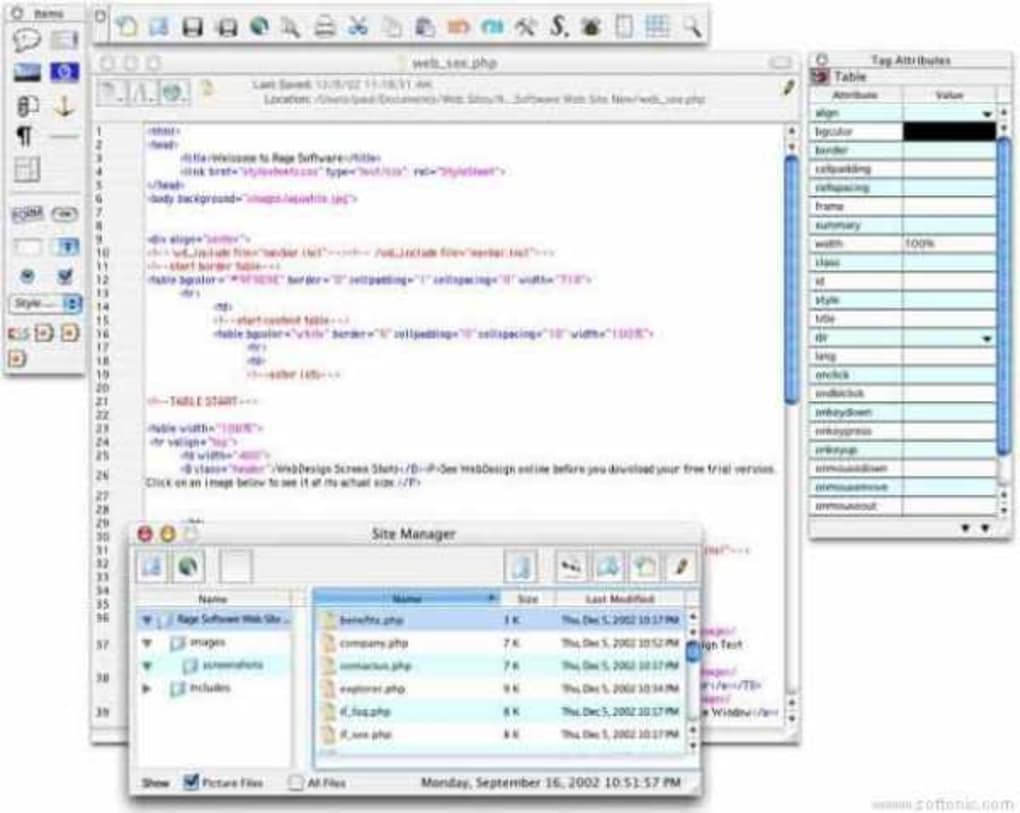
The feature set may appear modest compared with modern, cloud‑based editors, but each component is tightly integrated into a Mac‑centric workflow. The expandable interface lets you hide or reveal panels such as the file explorer, CSS editor, or FTP client with a single click, enabling a clutter‑free environment when you need to focus on code. Syntax highlighting is color‑coded, reducing the chance of missed tags and making debugging faster.
The live preview is especially handy for designers who want immediate visual feedback without launching an external browser. Although the FTP client lacks advanced queue management, it covers the essential need to push updates to a web host quickly. Overall, the feature list delivers a balanced mix of development and design tools without sacrificing the program’s reputation for speed and low memory usage.
Installation, Usage Instructions, and Compatibility
Installing RAGE WebDesign on a compatible Mac is straightforward. Begin by downloading the installer from the official website or a trusted software repository. The file is typically a compressed .dmg image.
Open the image, drag the RAGE WebDesign icon into your /Applications folder, and eject the disk image. Because the program targets Mac OS Carbon, it runs natively on Mac OS 9, Mac OS X 10.0‑10.4, and early PowerPC‑based Macs. Users on newer macOS versions may need to enable “Classic” support or run the app through a virtual machine that emulates an older OS environment.
Once installed, launch the application from the Finder. The first‑time setup wizard asks you to select a default workspace layout and optionally configure the built‑in FTP client with your server credentials. After completing the wizard, you’ll see the main editing window, which consists of three primary panes: the file explorer on the left, the code editor in the center, and the live preview on the right.
To create a new HTML file, click File → New, choose “HTML Document,” and start typing. The editor automatically applies syntax highlighting and suggests tag completions. For advanced usage, explore the “Snippets” menu to insert pre‑written code blocks such as navigation bars or meta tags.
Compatibility remains the program’s strongest selling point for legacy users. The Mac OS Carbon and earlier versions are fully supported, and the software runs smoothly on both PowerPC and early Intel Macs. Because it is a 32‑bit application, it cannot run on the latest macOS releases (Catalina and later) without a compatibility layer. Nevertheless, for educational institutions or developers maintaining older websites, RAGE WebDesign provides a secure, low‑resource solution that does not require frequent updates or an internet connection to function.
Pros, Cons, and Frequently Asked Questions
Pros
- Very low disk and memory usage – ideal for older hardware.
- Expandable UI allows personalized workspace.
- Live preview speeds up design iterations.
- Built‑in FTP client simplifies file publishing.
- Free trial version with no hidden costs.
Cons
- No support for macOS versions newer than 10.4 without workarounds.
- Limited language options – English only.
- FTP client lacks advanced features like batch transfers.
- Last major update was in 2008; no modern JavaScript frameworks support.
- Documentation is sparse compared to contemporary editors.
Frequently Asked Questions
Can RAGE WebDesign run on macOS Catalina or later?
Directly, no. The application was built for Mac OS Carbon, which is not supported on Catalina (10.15) or newer. Users can run it through a virtual machine emulating an older macOS version or use Classic support on legacy hardware.
Is the trial version fully functional or are features locked?
The trial version provides all core features, including the expandable UI, live preview, and FTP client. No major functionality is locked; the primary limitation is the lack of official support and updates.
Does RAGE WebDesign support CSS preprocessors like Sass or Less?
No, the editor does not have built‑in preprocessing capabilities. Users would need to compile Sass or Less files externally and then import the generated CSS into the project.
Can I import existing projects into RAGE WebDesign?
Absolutely. Use File → Open to load any HTML, XML, or CSS files. The editor will automatically apply syntax highlighting and integrate them into the workspace.
Is there a way to extend RAGE WebDesign with plugins?
The program does not support a modern plugin architecture. However, you can add external tools to your workflow (e.g., external validators) by configuring custom commands within the editor’s preferences.
Conclusion – Should You Download RAGE WebDesign?
RAGE WebDesign occupies a niche corner of the HTML editor market: it is a free, lightweight, and secure tool that shines on legacy Mac systems. If you are maintaining older websites, teaching HTML on machines that can’t handle today’s heavyweight IDEs, or simply need a no‑frills editor that launches instantly, RAGE WebDesign is still a solid choice. Its expandable interface, live preview, and integrated FTP client provide enough functionality to stay productive without the overhead of modern, subscription‑based platforms. On the downside, the lack of updates, limited macOS support, and minimal documentation mean it isn’t suited for cutting‑edge development or large‑scale projects.
For developers who value speed, low resource consumption, and a straightforward editing experience, we recommend downloading RAGE WebDesign today. Click the link below to get the free trial, install it on your compatible Mac, and start building clean HTML pages in minutes.
0 RAGE WebDesign continues to be a reliable option for users with older Mac hardware. Its speed and simplicity outweigh the lack of modern features, making it a practical tool for educational settings and quick site edits. While not ideal for developers needing advanced JavaScript tooling or modern CSS frameworks, its core HTML editing capabilities remain robust and dependable.






